by NeoThermic »Sat, 26 2008 Jan 16:58:15
Last year I attended the Nikon Expo in London. While I was there, I came across a company called
The Print Space.
I was offered the chance to have a 40x30 inch C-Type print done for free (worth £40). A free print? Why not! Their offices were located in London, so I planned to do the print when I was next travelling through London.
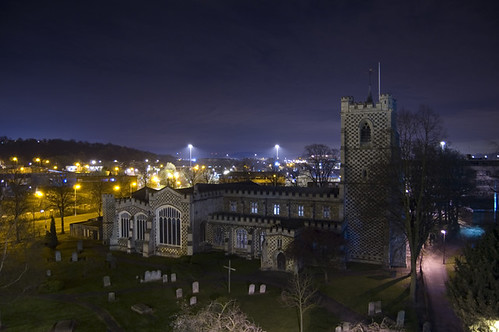
The first problem I had was choosing an image that I'd like to get printed. I had many an image in my collection taken by me, but I'd never really sat down and said "would this look good when printed at 40x30?". I sifted through my images, and finally settled on an image I shot on my D50:
I get down to the print space. It's a nice place, very open, very calm. There's a distinct change of feeling as you walk into the place from the London streets. The walls have various images from various artists on them, but not in a coarse way. Since it was my first visit, I was taken down to the retouching booth where my image was modified to be ready for print.
Since I had never printed my images at a professional print place or indeed never actually used colour profiles or large image sizes, I didn't know the workflow needed. For those that need to know, this is the basic workflow:
- Take original image (preferably RAW)
- Resize the image by 10% each time until you're at the correct printing size. So if you're printing a 40x30 inch print at 300dpi, you need to resize the image to 12000 x 9000 pixels.
- Apply the colour profile of the paper you wish to use (The Print Space provide their profiles for you)
- Make alterations as you require to the contrast, etc, until you're happy with the image
- Get it printed
You can do this on the Mac's that the print space has, or you can do it locally if you've got a calibrated setup and just bring it in for print right away.
Their prices are decent (and listed on their website). More interestingly, you're only limited to the size of a paper roll. For C-Type prints, that is a massive 30 by 1,968.5 inches. Imagine the panoramic you could print on that!

In short, if you want decent prints, these people are it. They have a customer for sure here!
Last year I attended the Nikon Expo in London. While I was there, I came across a company called [url=http://www.theprintspace.co.uk/]The Print Space[/url].
I was offered the chance to have a 40x30 inch C-Type print done for free (worth £40). A free print? Why not! Their offices were located in London, so I planned to do the print when I was next travelling through London.
The first problem I had was choosing an image that I'd like to get printed. I had many an image in my collection taken by me, but I'd never really sat down and said "would this look good when printed at 40x30?". I sifted through my images, and finally settled on an image I shot on my D50:
[url=http://flickr.com/photos/neothermic/2072644310/][img]http://farm3.static.flickr.com/2223/2072644310_789130a5cf.jpg[/img][/url]
I get down to the print space. It's a nice place, very open, very calm. There's a distinct change of feeling as you walk into the place from the London streets. The walls have various images from various artists on them, but not in a coarse way. Since it was my first visit, I was taken down to the retouching booth where my image was modified to be ready for print.
Since I had never printed my images at a professional print place or indeed never actually used colour profiles or large image sizes, I didn't know the workflow needed. For those that need to know, this is the basic workflow:
[list]
[*] Take original image (preferably RAW)
[*] Resize the image by 10% each time until you're at the correct printing size. So if you're printing a 40x30 inch print at 300dpi, you need to resize the image to 12000 x 9000 pixels.
[*] Apply the colour profile of the paper you wish to use (The Print Space [url=http://theprintspace.co.uk/uploads/profiles.zip]provide their profiles for you[/url])
[*] Make alterations as you require to the contrast, etc, until you're happy with the image
[*] Get it printed[/list]
You can do this on the Mac's that the print space has, or you can do it locally if you've got a calibrated setup and just bring it in for print right away.
Their prices are decent (and listed on their website). More interestingly, you're only limited to the size of a paper roll. For C-Type prints, that is a massive 30 by 1,968.5 inches. Imagine the panoramic you could print on that! :)
In short, if you want decent prints, these people are it. They have a customer for sure here!